


Free AI Restaurant Menu Generator
Create custom menus for restaurants, cafes, food trucks, and bars in less than a minute




Browse Through More Restaurant Menu Templates




Popular AI Design Generators

Sample Prompts You Can Modify and Use
“I've uploaded a Word document with our full restaurant menu, dishes, descriptions, and prices included. Design a professional, print-ready dinner menu layout using this content, organized into starters, mains, and desserts, formatted as a single-page A4 printable menu.”
“As the owner of a specialty coffee shop launching a new seasonal menu, write a cafe menu featuring 8 hot drinks, 6 cold drinks, and 4 food items — descriptive and artisanal in tone, organized by category, and formatted as a printable A4 menu board.”
“Write a menu for a Korean-Mexican fusion food truck targeting lunch crowds in a busy city center. It should sound exciting and adventurous, featuring 5 main dishes, 3 sides, and 2 specials, with dish names that reflect the fusion concept clearly, formatted for both a printed board and a digital QR code menu.”
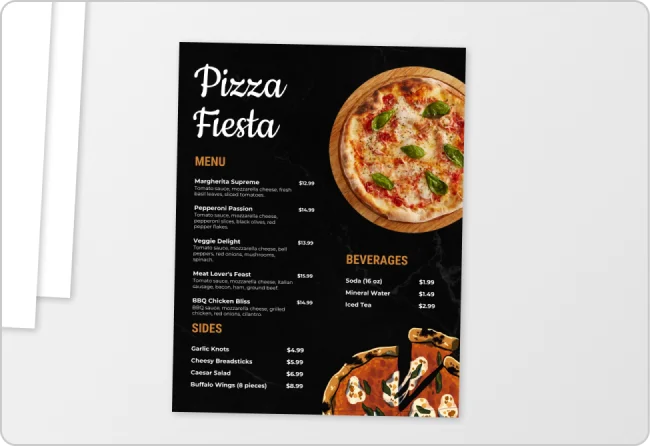
“I've uploaded our current restaurant menu. Redesign it into a more modern, visually appealing layout but keep all the existing dishes, descriptions, and prices exactly as they are, and format it as a print-ready single-page A4 menu.”
How to Create a Restaurant Menu Using AI
Step 1
Enter Your Menu Details or Upload an Existing Menu
Type your restaurant type, cuisine, dish names, descriptions, and prices into the prompt field or upload an existing menu to redesign it. The more detail you provide, the more accurate your menu design will be.
Step 2
Generate Your Restaurant Menu Design
Click generate and Venngage's AI produces a complete restaurant menu — layout, typography, color palette, and visual hierarchy — matched to your cuisine instantly. A fine dining menu feels elegant, a food truck menu bold, a cafe menu warm, and a cocktail bar menu atmospheric.
Step 3
Edit Your Menu With Venngage's AI Tools
Use the AI Designer to adjust the layout, reorganize sections, and update fonts and colors. The AI Writing Assistant can help rewrite dish descriptions, sharpen menu copy, or add daily specials without rebuilding the design from scratch.
Step 4
Apply Your Brand With the Brand Kit
Apply your restaurant's exact fonts, colors, and logo across every menu format in one click so your printable menu, digital menu, and QR code menu all look consistently on-brand across every surface.
Step 5
Export as a Printable Menu or QR Code Menu
Download as a print-ready PDF for physical and laminated table menus, or PNG for digital display screens and social media. To create a QR code menu, paste your shareable menu link into Venngage's QR code generator and download a print-ready QR code for every table.
Design Professional Menus as an Independent Restaurant Owner
Most independent restaurant and cafe owners have attempted to redesign their menu, making Word do something it was never built to do. Venngage fixes that. Type your dishes, descriptions, and prices or upload your existing menu and get a professionally designed, print-ready restaurant menu in minutes.
Use the Brand Kit to lock in fonts, colors, and logo across every menu format, and export an updated PDF every time something changes. No designer, no starting from scratch every season.
Generate Restaurant Menus